Transform and minimize before the boundary, not after.
Keygraph reached a point where we could no longer answer basic business questions from memory.
Early on, we knew every customer and every deployment. We could do the mental arithmetic needed to answer questions ranging from "How many customers do we have?" to "How many scans are currently running?" We were speaking with nearly every customer every day.
As we grew, that stopped scaling. We needed a proper "business intelligence" AKA BI system to understand product usage, customer engagement, and how deals were progressing.
The complication was that our production architecture was deliberately designed without a single, company-wide view of customer activity.
Keygraph uses a shared-nothing, cell-based architecture. Each customer chooses a region when they sign up. North American customers run in AWS us-west-2, while European customers run in eu-central-1.
Each cell has its own AWS account, PostgreSQL databases, and supporting infrastructure, including SpiceDB, ClickHouse, Temporal, and Redis. The data is isolated by design. No single production database can tell us how the business is performing as a whole.
The commercial context, including contracts, deal stages, and revenue, lives separately in Attio, our CRM.
The challenge was bringing these worlds together without weakening the architectural and data-isolation boundaries we had deliberately put in place.
Two designs we rejected
The quickest option was to point the BI tool at everything:
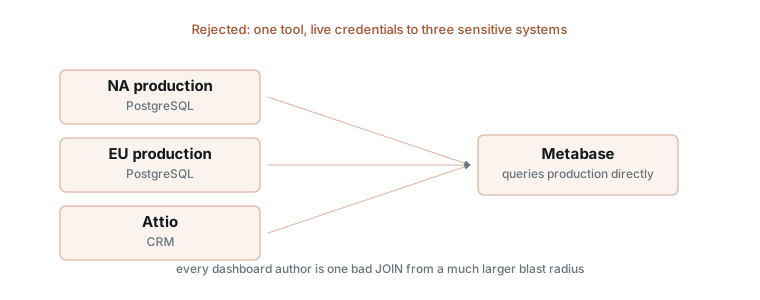
That would give one tool network access and live credentials to three sensitive systems. Production databases would sit in the interactive query path, and a dashboard author could expose far too much data with one broad query or export.
The conventional warehouse option looked better:
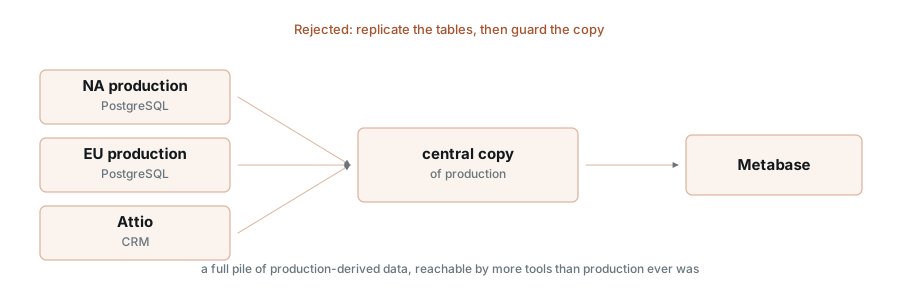
It removed production from the query path, but only by copying production data into a centralized warehouse. That would move far more customer data than we needed across account and regional boundaries, then place it somewhere more people and tools could access.
We only needed a narrow reporting dataset for our BI purposes. Replicating production was not just a large answer to a small question - it would have weakened the boundaries the architecture was designed to preserve.
The rules we started with
Before we picked tools or started wiring systems together, we set out a few guiding principles. We wanted to make sure the shape of the solution followed our security and privacy requirements, rather than trying to bolt those on later.
- Metabase, our BI tool, never connects to production. It gets a read-only role on one analytics database, scoped to the reporting schemas.
- Product identifiers change before routine extraction. The standard product feed contains pseudonyms instead of emails or domains.
- Views name every exported field. We do not copy whole tables.
- Pseudonyms stay stable. Activity from the same customer must group correctly across scans and sync runs.
- Identity resolution has its own path. Most analysis does not need a customer name. The few workflows that do use a narrower route.
Those rules closed off plenty of convenient shortcuts.
The architecture
Those rules led us to split the system into two paths. Routine analytics follows a standard path that carries pseudonymous product records from each production cell into the reporting mart. Identity resolution follows a separate, more restricted path that is used only when a workflow needs to connect those records to customer information in Attio.
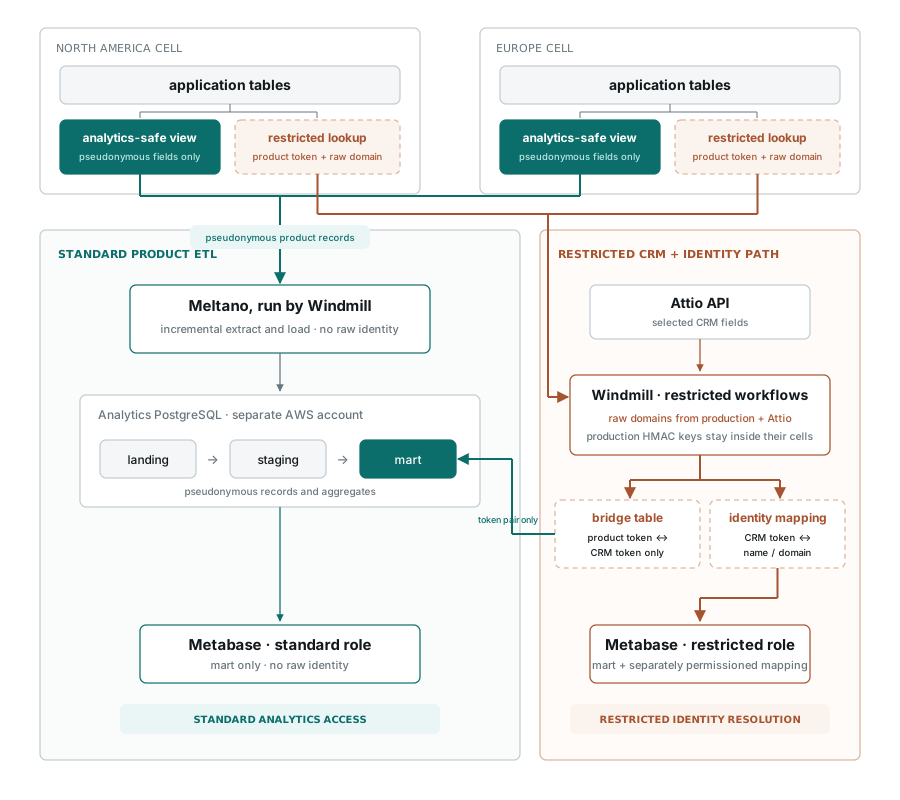
Most analysis stays entirely on the standard path. The identity workflow sees the domains needed to match production organizations with Attio and writes only the resulting token pairs into the bridge. Re-identification remains outside the routine analytics flow and behind a separate permission.
The contract at the production boundary
Each production cell exposes the same small analytics contract. Metabase never reaches through it to production.
What enters the analytics database
The exported product data looks roughly like this:
pseudonymous organization token
source region
scan status
scan timestamps
aggregate findings count
aggregate token usage
Keygraph does not store customer source code. A scan may temporarily access a repository inside an isolated, single-use execution environment, but the repository contents are discarded when the analysis finishes.
The analytics system receives only a narrow set of usage and operational fields. It does not receive repository contents, vulnerability evidence, finding-level snippets, remediation diffs, AST fragments, prompts, model responses, or intermediate analysis artifacts.
The production view is where that boundary becomes concrete.
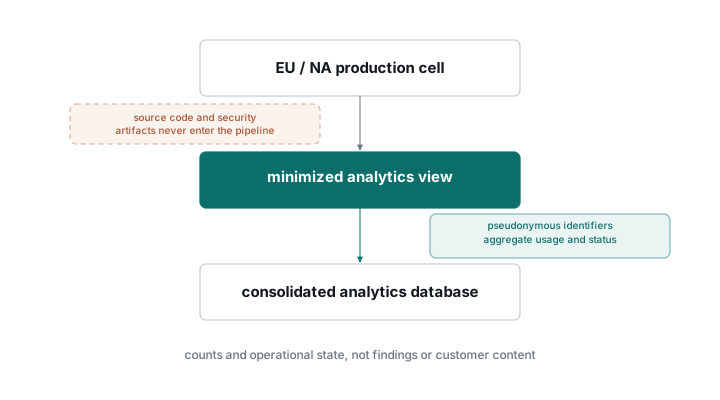
The view is the contract
Meltano, our ETL tool of choice, has no general read access to the production schemas. Each cell publishes analytics views through the normal schema-migration process. The shape is deliberately boring:
scan_run_token      scan_status_cat     scan_date
organization_token  scan_type_cat       duration_ms
repository_token    trigger_reason_cat  source_region
                    error_category_cat  updated_at
Emails, domains, user names, billing details, and arbitrary application metadata are absent.
Here is a shortened version of one view:
CREATE OR REPLACE VIEW analytics_export.scan_runs AS
SELECT
    analytics_export.tok('scan_run', scan_run_id::text)     AS scan_run_anon_id,
    analytics_export.tok('org',      organization_id::text) AS org_anon_id,
    analytics_export.tok('repo',     repository_id::text)   AS repo_anon_id,
    scan_type_cat, scan_tool_cat, trigger_reason_cat,
    scan_status_cat, sast_language_cat, error_category_cat,
    date_trunc('day', coalesce(started_timestamp, created_timestamp))::date AS scan_date,
    CASE WHEN finished_timestamp IS NOT NULL AND started_timestamp IS NOT NULL
         THEN (extract(epoch FROM (finished_timestamp - started_timestamp)) * 1000)::bigint
    END                                                     AS duration_ms,
    coalesce(finished_timestamp, started_timestamp, created_timestamp) AS updated_at,
    (SELECT value FROM analytics_export.config WHERE key = 'region')   AS source_region
FROM core.scan_runs;
The select list tokenizes every identifier. Anything left out stays in production.
The ETL role can read the export views and execute the tokenization function. It cannot read the application tables or config. PostgreSQL views run with their owner's privileges unless they use security_invoker = true, so the view controls which application data the role can reach.
The migration role owns these views. None use security_invoker. These are the grants:
GRANT USAGE   ON SCHEMA analytics_export TO etl_reader;
GRANT SELECT  ON ALL TABLES IN SCHEMA analytics_export TO etl_reader;
GRANT EXECUTE ON FUNCTION analytics_export.tok(text, text) TO etl_reader;
REVOKE SELECT ON analytics_export.config FROM etl_reader;
config holds the HMAC key. The SECURITY DEFINER function reads that key as its owner, so the ETL role can call the function without reading the table.
The view definitions contain the field allowlist, while the object grant is broader. We tested the effective permissions in production. The role could read every export view and run tokenization. It could not read config or the application tables.
Putting the view in a migration gave us a useful review point. Every new analytics field arrives in a pull request, where someone has to answer a plain question: should this data cross the boundary, and in what form?
Data minimization now has a diff.
What HMAC buys us
We need the same input to produce the same pseudonym across syncs, so each production cell uses a keyed hash:
HMAC(production_key, "org:" || organization_id) -> 8c73d1e09f...The input is an internal UUID rather than a domain. Confirming a mapping requires the key plus a candidate organization ID, and those IDs can appear in application URLs and API responses. We do not add a per-record salt because that would break the stable grouping we need.
This raises the cost of confirming an identity. It does not make the token irreversible. Key custody still does most of the work.
Each production key stays inside its cell. The ETL role can produce a token without ever holding the key.
Moving and joining the data
The two production feeds still need to meet the CRM data. We wanted that join without putting raw identity into the reporting mart.
The EU data crosses regions
The analytics database runs in North America, so a narrow operational dataset from the EU cell crosses regions. Customer Content stays in the production region the customer selected. Only the absolute minimum usage and operational fields needed for reporting cross the boundary.
Each cell transforms direct identifiers before a record leaves production. We encrypt the records in transit and at rest, and we continue to treat the result as personal data.
Two cells, one dataset
Both cells expose the same view contract. Every row carries source_region = 'na' or 'eu', and Meltano lands both feeds in one dataset.
The loader uses the pseudonymous ID plus source_region as its composite key. That keeps the two cell namespaces explicit after the records land together.
Why Meltano runs inside Windmill
Windmill, which runs our internal workflows, already had a private Tailscale path to both cells. Running Meltano there let us reuse its access controls, secrets management, execution history, and operational ownership. We avoided another always-on service with production credentials and another network route to review.
For security-sensitive plumbing, fewer privileged components usually wins.
Extraction and loading are Meltano's whole job. Reviewed SQL in our operations repo handles the staging-to-mart transforms, with Windmill running the scripts.
The jobs track the updated_at bookmark in S3, load incrementally, reconcile fully on a schedule, and rebuild the reporting mart from the current landing state. S3 stores only the bookmark timestamps.
The CRM side
Attio contains direct customer identifiers alongside commercial details such as deal stage, plan, and contract context. Copying it wholesale would undo the care we took on the production side and effectively create a customer directory inside the BI database.
We wrote a custom Singer tap for Attio that requests only the fields this pipeline needs. The workflow then hashes the selected identifiers with a separate key held by Windmill. Using separate keys keeps the identity scopes distinct: a production token should not become a universal customer identifier across every internal system.
There is an important asymmetry here. Product identifiers are transformed inside PostgreSQL, so Meltano receives only pseudonyms. The Attio workflow must briefly receive the selected raw identifiers before Windmill can hash them. We therefore give that workflow narrower access and treat it as a sensitive component.
The identity bridge
The product and CRM tokens use different keys, so they do not match. The bridge is the component that connects them.
Neither runtime holds both keys. The bridge asks each production cell to calculate analytics_export.tok('org', organization_id::text) and return the production token with the raw organization domain. Windmill sees the domain. The production key stays inside the cell.
On the CRM side, Windmill has the Attio domain and the CRM token produced with the separate CRM key. It matches the domains and writes the product-token-to-CRM-token pair into the bridge table. The mart joins through that pair and never receives either raw domain.
The bridge job is the pipeline's most privileged component because it performs the identity match.
Who gets to resolve an identity
Routine analytics and identity resolution use different database roles.
The mart can report that customer_9f31a2 started three scans, generated 42 findings, and used 1.8M tokens. A standard analytics user cannot turn customer_9f31a2 into a customer name.
We kept names out of the mart and split the access paths:
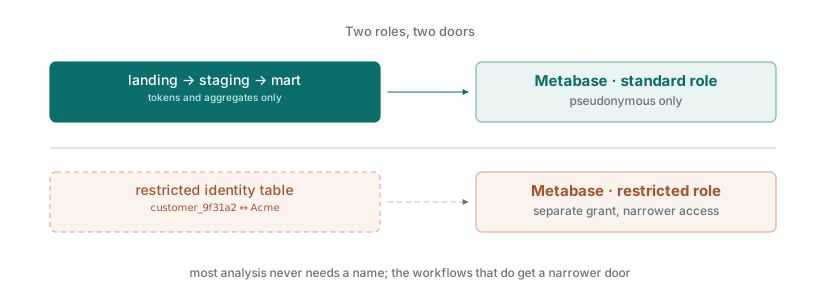
Metabase connects through two roles. The standard role can read the mart schema. A restricted role can also read the identity mapping, which is the permission that turns a token into a name.
Standard analytics access cannot read that mapping. Only authorized internal workflows get the restricted role.
What this design does not solve
Pseudonyms reveal plenty in a small B2B dataset. Region, plan, usage, and finding count can identify a customer to an informed internal reader. Pseudonymization keeps identifiers out of routine logs, exports, and third-party tools. It will not stop a motivated employee who already knows the customer base.
The real control is access to the mart. Ours is limited to the business team that needs customer-usage context for follow-up. The rest of the company has no route to it.
Deleting keys does not delete history. Removing an HMAC key and the restricted mapping closes the normal re-identification path in the live system. Backups, snapshots, exports, and disaster-recovery copies keep their own schedules and are not rewritten retroactively.
The identity mapping is rebuilt from live production. Deletions in the incrementally extracted product data propagate during reconciliation, not immediately.
That is still a cleaner deletion story than raw identifiers spread across landing, staging, mart, and dashboards. There is no magic delete button.
What this bought us
We can now answer questions about product usage and customer engagement across both production cells without giving the BI system access to either one.
Metabase sees a deliberately small reporting dataset. It does not hold production credentials, it cannot browse application tables, and it does not receive a wholesale copy of production. Most analysis works with stable pseudonyms. When a workflow genuinely needs to connect activity to a customer name, it goes through a separate and more restricted path.
This does not make the data anonymous, and it does not remove every privacy risk. What it gives us is a narrower blast radius, fewer places where raw identifiers exist, and permissions that correspond to the actual questions people need to answer.
The biggest shift was treating analytics as another boundary to design, rather than a place where existing boundaries stopped applying. We decided what could leave production, in what form, and who could reconnect it to an identity before we chose the tools that would move or display it.
The dashboard was the final layer. The important work was deciding what data could reach it.
We build the Keygraph platform for security teams that need continuous pentesting without treating data boundaries as an afterthought. Read more about our code security posture, or talk to us about your deployment requirements.